Free desktop app for Claude Code, Codex & other AI agents Every project. Every agent.
One window.
lpm runs your dev servers and AI coding agents side by side, so you stop juggling terminals.
- Start every service in one click
- Give each agent its own copy
- See which agent needs you
Start a project, then hand it to Claude Code or Codex — one click each
Start a project, then hand it to Claude Code or Codex — one click each
A one-minute tour: start a project and hand it to Claude Code.It all runs in your browser.
lpm is a desktop app with a multi-pane terminal workspace. Open this page on your computer to try the interactive demo.
Get lpmOr check your computers from your iPhoneStop hunting for the window that’s waiting on you
From 8 windows to 1 window
Same 5 services and 3 agents, and a sidebar that shows which one needs you.
Before, on the left: 8 separate terminal windows on a desk. 5 are services, on ports 3000, 3001, 8080, 6379 and 8888. 3 are AI agent sessions: a Claude Code run in auth-service that stopped to ask permission before a database migration, with the api window lying on top of its options; a Codex run still working; and a second Claude Code run that finished and asked a question nobody saw. After, on the right: one lpm window on the same desk. Its sidebar lists 4 running projects with the agent under each: amber with a bell for the one that needs you, a shimmer for the one still working, blue with a check for the one that is done. The auth-service services are tabs, and the waiting session is in front with its permission prompt in plain sight, in the spot where the buried window was.
8 windows · 5 services · 3 agents
Run it on a project you already have
Add a folder, press Start, open Claude Code or Codex. Free, open source, no account.
Up and running in three steps
Step 1: Add a folder
Pick a project folder or paste a Git URL. lpm finds the dev servers inside and sets them up for you.
Step 2: Start everything
Press Start and every service boots at once, each with its live output in a tab of its own.
Step 3: Run agents in parallel
Open Claude Code or Codex with one click. Duplicate the project to give each agent its own copy.
Watch it in the real app
Six lessons, 11 minutes in all. Start with the one-minute overview.
Lesson 1 of 6: lpm in 60 seconds
lpm in 60 seconds
The whole loop in one take: start a project, stop it, switch to another, and open Claude Code from the project header with one click.
 01Length 1:03
Start, stop and switch projects, then hand one to Claude Code.
 02Length 2:27
Pick a folder or clone a repo. lpm fills in the dev servers it finds.
 03Length 1:55
Every service boots with live output in a tab of its own.
 04Length 2:06
Turn tests, migrations and deploys into one-click buttons.
 05Length 1:47
Boot only the services you need right now.
 06Length 1:50
Duplicate the project so each agent works in its own copy.
Want the full series? Watch every lesson on YouTube.
The same terminal, on your Mac and in your pocket
When Claude Code, Codex or Gemini CLI needs you, your iPhone gets a notification. Answer from the phone, then take control back at your desk — one session, running on your Mac the whole time.
An illustration of one Claude Code session on a Mac and an iPhone. The agent tightens a login rate limiter in lpm on the Mac, then stops to ask before committing, and the locked iPhone gets a notification. Opening it brings up the same terminal on the phone, which takes control, so the Mac shows “Active in iPhone” with a Take control button. From the phone you answer “yes — commit & open the PR” and the agent carries on. Then the Mac takes control back and the phone shows the terminal is active there.

lpm link for iPhone and iPad. Scan one QR code to pair it with your computer. See the iPhone app
Pair once, then run Claude Code and Codex on the Mac mini
Add a Mac
Connect this Mac to another Mac running lpm.
On this network
Open its projects here
Your Macs
Nothing connected yet.
On your laptop, + → Another computer lists the Macs nearby. Click one and accept on the Mac mini once both screens show the same 6-digit code. Then start Claude Code and Codex in one of its projects: they run on the Mac mini, and your sidebar shows what each is doing.
Don't see it nearby? Paste a one-time invite from the Mac mini, or type its address and code.
Linux hosts you connect to
What lpm does with that one line
- Reached build-server over SSH
- Installed lpm on the server
- Paired with a one-time invite
- Forwarded its port over SSH
Settings → Connections in lpm on your Mac. One field, and lpm does the install, the pairing, and the tunnel.
Also in the iPhone app
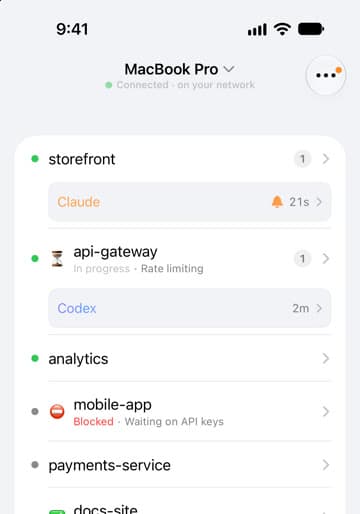
- Every projectWhich agent is working, done or waiting on you.
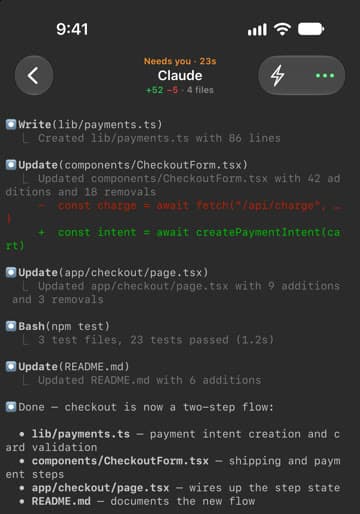
- Answer an agentA push opens the session. Reply, then pick it up at your desk.
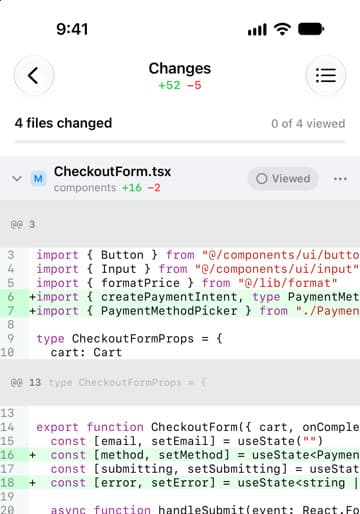
- Git reviewRead the diff, commit with an AI-written message, open a PR.
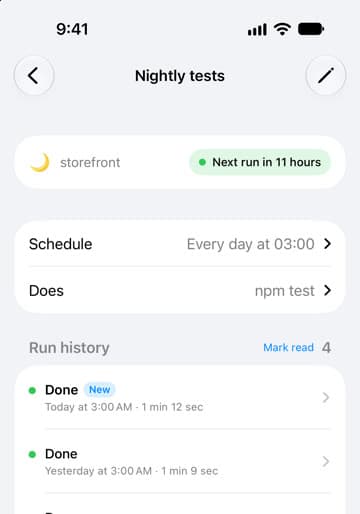
- AutomationsRun, pause or edit scheduled tasks and read every run.
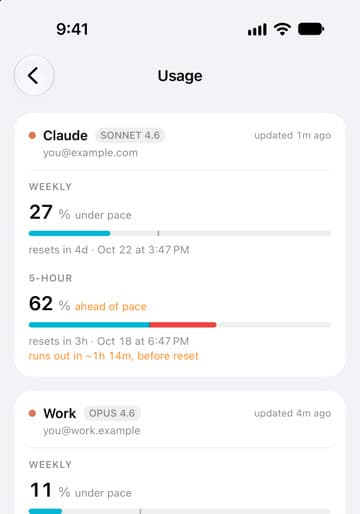
- Usage limitsClaude and Codex 5‑hour and weekly windows, and your pace.
From the first dev server to an open pull request
All of it is free, with no paid tier and no account. Pick a feature to see how it works.
Run projects
Point lpm at a folder and press Start.
AI agents
Claude Code and Codex, side by side.
- Claude Code, Codex, Gemini, OpenCode
- See who’s waiting on you
- A composer for prompts
- Run in duplicates
- Copies and Git worktrees
- Memory shared between agents
- Multiple Claude Code accounts
- Status line designer
Slash commands, resume, fork and model switching are for Claude Code and Codex only; live status and alerts also cover Gemini CLI and Cursor CLI.
Review and ship
Check the diff, commit, open a PR.
Automate and monitor
See what your agents are doing and using.
Across devices
Your projects, wherever they run.
- Builds for macOS, Windows and x86-64 Linux
- Any stack that runs in a terminal
- No Docker required
- Dev servers keep running after you quit
Questions developers ask before downloading
Is lpm free?
Yes. Free and open source under the MIT license, with no paid tier and no account.
Full answerShow less
Yes. lpm is free and open source under the MIT license. There is no paid tier and no account: download it from lpm.cx, or browse the source on GitHub.Which systems does lpm run on?
macOS 12 or later, on Apple Silicon and Intel. Windows 11 and x86-64 Linux are in beta.
Full answerShow less
macOS 12 or later, with one build for Apple Silicon and one for Intel, both signed with an Apple-issued Developer ID and notarized by Apple. Windows and Linux are in beta: Windows 11 on x64 with Git for Windows installed, and 64-bit x86 Linux with glibc 2.35 or newer (Ubuntu 22.04 and up) as a .deb, .rpm or AppImage. The Windows and Linux builds aren't code-signed yet. None of them uses Electron.Does lpm detect my services automatically?
Yes. It reads package.json, Procfile, Docker Compose and Python, Rails, Go or Rust projects, on your computer and with no AI.
Full answerShow less
Yes. When you add a folder or clone a repo, lpm reads its files (package.json, Procfile, Docker Compose, and Python, Rails, Go or Rust projects, including apps inside a monorepo) and sets up each dev server with its start command and, when it can tell, its port. Detection runs on your computer with no AI involved. If nothing is found, you get a starter service to fill in, and your AI agent can draft the setup for you.Which AI coding agents does lpm support?
Claude Code and Codex get one-click buttons and live status. Gemini CLI and Cursor CLI get live status, and any other CLI agent runs in the terminal.
Full answerShow less
Claude Code and Codex get one-click buttons from the first launch and the deepest integration: live working, done and needs-you status, sounds and system notifications, resume and fork, and a model and effort picker. Gemini CLI and Cursor CLI report live status with sounds and notifications too. Gemini CLI and OpenCode can be added as one-click buttons, and any other command-line agent or script runs in the built-in terminal. lpm doesn't install the agents; you use your own CLI and account.Does lpm replace my terminal or editor?
It can replace your terminal, with tabs, split panes, search, a Files tab and diff review. It opens projects in your editor.
Full answerShow less
It can replace your terminal: every project gets tabs, split panes, search, a Files tab with an editor, diff review and, on macOS and Windows, a built-in browser tab. It works alongside your code editor, and one click opens a project in Cursor, VS Code, Zed and others.Is there an iPhone app?
Yes. lpm link pairs by QR code, mirrors your terminals live and tells you when an agent needs you.
Full answerShow less
Yes. lpm link pairs with your computer by QR code. It mirrors your terminals live so you can type into them, shows which agent needs you, sends encrypted push notifications, and lets you start projects, review diffs, commit and run automations. Everything still runs on your computer.Does lpm work with remote servers?
Yes. Run a project over SSH, or add a Linux server with one SSH string and keep its agents running there.
Full answerShow less
Yes, in three ways. An SSH project runs its terminals, services and actions on any server you can SSH into. Or add a Linux server with one SSH string: lpm installs itself there (x86-64, Ubuntu 22.04 or newer), and the server's projects show up in your sidebar and keep running on the server. Or pair a Mac that stays on, like a Mac mini, and run Claude Code and Codex there from your laptop.Does lpm collect my code or telemetry?
No. The desktop app has no analytics, telemetry or account.
Full answerShow less
No. The desktop app has no analytics, telemetry or account. It checks GitHub for updates, and AI features such as commit messages run through your own agent CLI. If you pair an iPhone and turn on push notifications, they are sealed on your computer and relayed through lpm.cx, which can't read them. Only this website uses visitor analytics; see the privacy policy.How does lpm update?
It checks at launch and every 24 hours. On macOS one click updates and relaunches, and your dev servers keep running.
Full answerShow less
lpm checks for a new version when it opens and every 24 hours while it runs, and you can choose Check for Updates… from the lpm menu. On macOS, an update button appears in the sidebar: one click downloads it, replaces the app and relaunches, and your dev servers keep running through the update. On Windows and Linux, lpm tells you about the new version and opens its download in your browser; run the installer or install the package to update.How do I uninstall lpm?
Settings → General → Remove app. It cleans up its command, hooks and skills, and never touches your project folders.
Full answerShow less
Open Settings → General → Remove app. lpm stops your projects and removes thelpmcommand, its agent skills, the hooks it added to Claude Code and Codex, and its Claude Code status line. On macOS it also moves the app to the Trash, with an option to erase its settings, project configuration and notes. On Windows, finish in Settings → Apps → Installed apps; on Linux, remove the package or delete the AppImage. Your project folders are never touched. To do it by hand on macOS, quit lpm, move lpm.app to the Trash, delete/usr/local/bin/lpmand~/.lpm, then remove the lpm hooks in~/.claudeand~/.codexand the lpm skills in~/.claude/skillsand~/.agents/skills.
Didn’t find your question?
Ask the maker and other users, or read the docs.
Built in the open
lpm is free and open source. Thanks to everyone who has landed a commit.
From GitHub, refreshed hourly.
Recently fixed from your reports
- [Bug] Three-dot menu in Claude Accounts settings does not open#132 · fixed in under a day
- Multi-account switching support for Claude Code#133 · fixed in under a day
- Repository `.lpm.yml` actions execute without provenance-aware approval#103 · fixed in 76 days
- IME input on macOS: candidate-commit Enter submits the prompt; Shift+punctuation dropped in the terminal#127 · fixed in under a day
Get lpm
Free and open source, for macOS, Windows and Linux (x86-64).
Recommended for this Mac
macOS · Apple Silicon
macOS 12 or later · 29.4 MB · v0.7.41
Signed and notarized by Apple
Your browser doesn't say which chip this Mac has, and most have Apple Silicon. Intel chip? Get the Intel build. Apple menu → About This Mac shows which one yours has.
Know exactly what you’re installing
Open source, shipped from public GitHub releases. The Mac builds are signed under Developer ID N7S7ZCZ5P7.
Notarized on macOS. The Mac builds are signed with an Apple Developer ID and notarized, so Gatekeeper opens them.
Windows and Linux beta. Not code-signed yet, so compare the SHA-256 checksums below. The Windows installer needs no admin rights.
Private. No account or telemetry. Besides GitHub update checks, only optional iPhone push reaches an lpm server. Privacy
Your commands only. Runs what you configure as your user and adds status hooks for Claude Code, Codex, Gemini CLI and Cursor CLI.
Native builds. macOS 12 or later on Apple Silicon or Intel, Windows 11 x64, and 64-bit x86 Linux. No Electron.
SHA-256 checksums for v0.7.41Oct 25, 2026
Compare after downloading. Only the macOS builds are signed, so for the Windows and Linux beta the checksum is the integrity check. View release
- macOS:
shasum -a 256 <file> - Windows (PowerShell):
Get-FileHash <file> -Algorithm SHA256 - Linux:
sha256sum <file>
- macOS Apple Silicon (arm64)29.4 MB
- d018088ed33ec9a04d406bf590d81edd8c243a4adab9a2418f1717a9e71e1a9a
- macOS Intel (x86_64)30.7 MB
- 07ee907d6c5dabd1a4d0f5ab0a2c077b6558b17cee3410f6b18ef3b775f46ed6
- Windows installer (x64)23.8 MB
- bcae52b642283b753de3162f35aaafd50f9b7fd546b733de7ca206ad70886994
- Linux .deb (amd64)31.1 MB
- 75f0f2be8e16736d77969895b4f72e3b12d308cddc3783ee7b1a1e6ac7aee20a
- Linux .rpm (amd64)31.1 MB
- 0afc1e0842151b2a8483c24a84c1733ceb5d61008960afb346d97117889f88ff
- Linux AppImage (amd64)106.9 MB
- 2e1f065aa48e305d71f856f65c078657c4a8bd257ffcffcb466296d56ed9fbe9
How to remove lpm
Choose Remove app in lpm's settings: it stops your projects and removes the lpm command, its agent skills, its Claude Code and Codex hooks and its Claude Code status line. On macOS it also moves the app to the Trash and can erase settings, project config and notes. On Windows, finish in Settings → Apps → Installed apps; on Linux, remove the package or delete the AppImage. Both keep your settings in ~/.lpm.
By hand on macOS: quit lpm, trash lpm.app, delete /usr/local/bin/lpm and ~/.lpm, then remove the lpm hooks in ~/.claude and ~/.codex and the lpm skills in ~/.claude/skills and ~/.agents/skills.