Skip to content

Built into lpm · macOS

Create Claude Code & Codex skills. Without hand-writing SKILL.md.

lpm scans every folder your agents read skills from, shows what each skill costs in context, and gives you one dialog to create and edit them — with AI drafting the fields from a plain-English description.

AI drafts the fieldsEdit any skill in placeContext cost, visible

From dotfile spelunking to one dialog

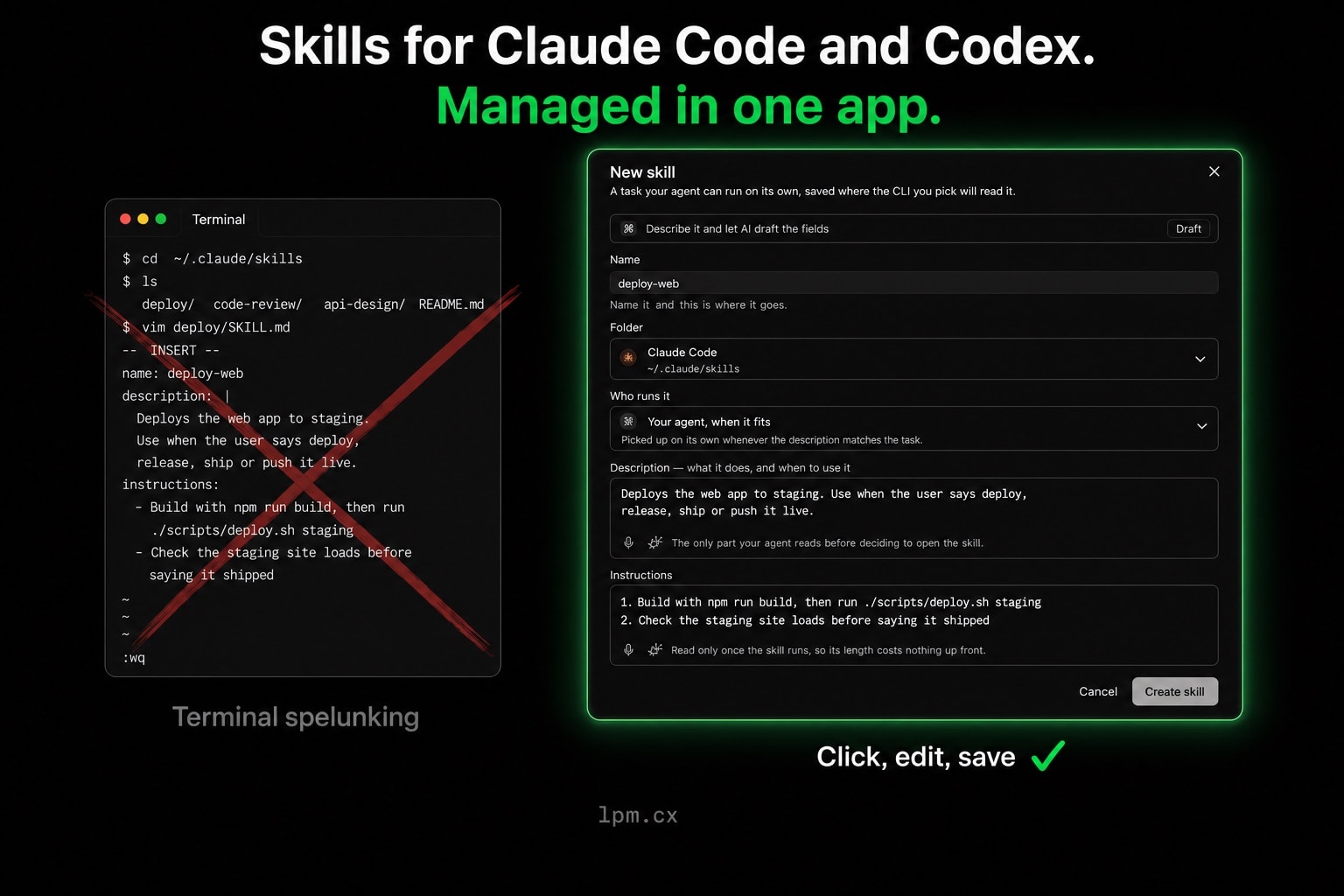
A skill is a SKILL.md file in a dotfolder — easy for agents to read, fiddly for you to maintain. lpm turns it into a form, with an AI Draft bar that fills every field from one sentence.

Claude Code · Codex
Editing SKILL.md by hand in a terminal, crossed out, next to lpm's New skill dialog with AI drafting, folder, run mode, description, and instructions fields
  • Folder

    Saved straight into a folder the CLI you pick already reads — no wondering where the skill goes.

  • Who runs it

    Your agent, when the description fits — or manual-only, invoked with /name or $name.

  • Description

    The only part your agent reads before deciding to open the skill. lpm shows its per-turn token cost.

  • Instructions

    Read only once the skill runs, so their length costs nothing up front.

One dialog, both CLIs

Skills live in folders — lpm knows them all

Claude Code and Codex each read skills from their own places. lpm scans every root, shows what is installed for each CLI, and writes new skills where the CLI you pick will read them.

Claude Code

/skill-name

lpm writes a standard SKILL.md, so everything works exactly as if you had written it by hand.

  • Personal skills in ~/.claude/skills, project skills next to your code
  • Auto-run when the description matches, or manual-only on request
  • Manual-only skills stay out of context entirely — zero tokens up front
  • Per-skill estimates of what each description costs every turn
Claude Code skills docs

Codex

$skill-name

The same dialog writes Codex skills, including the shared folder other agent CLIs read too.

  • Skills in ~/.codex/skills, plus the shared ~/.agents/skills folder
  • Invoked with $name — lpm shows the right token for each folder
  • Manual-only supported here too, kept out of context until you call it
  • Descriptions validated against what both CLIs actually accept
OpenAI Codex CLI docs
Made for daily agent work

Skills should be easy to write and cheap to keep

Describe it, AI drafts it

Type one sentence about the task. lpm reads your repository and drafts the name, description, and instructions to match how your project actually works. Nothing is saved until you click Create.

Edit without breaking files

Reopen any skill — including ones you wrote by hand — and change its description, instructions, or who runs it. lpm rewrites only the fields you touched and leaves everything else exactly as it was.

See what skills cost

Skill descriptions are loaded before every turn; instructions only when a skill runs. lpm estimates both, so you know which skills are cheap to keep and which deserve a manual-only switch.

Three steps in lpm

From idea to installed skill in a minute

01

Open Skills & tools

Press ⌘⇧K in any project, or pick Skills & tools from the ˅ menu beside the terminal tabs. lpm scans every folder Claude Code and Codex read skills from and lists what it finds.

02

Create a new skill

Click New skill, describe the task, and let AI draft the fields — or fill in the name, description, and instructions yourself.

03

Refine as you go

Pick who runs it and press Create. Reopen the same dialog any time to edit, and deleted skills go to the Trash — never gone for good.

FAQ

What to know about agent skills

How skills work, what they cost in context, and what lpm writes to disk.

  • What is a Claude Code skill?
    A skill is a folder with a SKILL.md file: a short description the agent always sees, and instructions it reads only when the task matches. Claude Code loads skills from ~/.claude/skills and from .claude/skills inside a project; Codex reads its own folders. lpm scans all of them and lists what each CLI can use.
  • How do I create a Claude Code skill in lpm?
    Open a project and press ⌘⇧K — or choose Skills & tools from the ˅ menu next to the terminal tabs — then click New skill. Name it, pick the folder for the CLI you want, choose who runs it, and write the description and instructions — or describe the task in one sentence and let AI draft every field.
  • Can AI write the skill for me?
    Yes. Describe what the skill should do and click Draft. lpm reads your repository without changing it and fills in a suggested name, description, and instructions that match how your project works. Drafting only fills the form — nothing is written to disk until you click Create skill.
  • Does it work with Codex?
    Yes. The same dialog writes Codex skills to ~/.codex/skills or the shared ~/.agents/skills folder. Codex invokes skills with $name instead of /name, and lpm shows the right invocation for whichever folder you pick.
  • Can I use one skill with both Claude Code and Codex?
    Each CLI reads its own folders, so a skill lives where its CLI looks: Claude Code reads ~/.claude/skills and a project's .claude/skills, while Codex reads ~/.codex/skills and the shared ~/.agents/skills folder that other agent CLIs read too. The dialog is identical either way — pick a different folder and lpm writes the same SKILL.md format there.
  • What does the “Only you” run mode mean?
    A manual-only skill never triggers on its own and stays out of the agent's context, so it costs no tokens until you invoke it by name. lpm can mark skills manual-only for both Claude Code and Codex.
  • Can I edit skills I wrote by hand?
    Yes. Reopen any skill and change its description, instructions, or run mode. lpm rewrites only the fields you touched, so custom frontmatter, comments, and formatting in hand-written files survive edits untouched.
  • Where is everything stored?
    In the same local folders the CLIs already read — nothing is uploaded or synced to a website. Deleting a skill moves its folder to the macOS Trash, so you can always get it back.

Give your agents skills worth keeping.

lpm keeps Claude Code and Codex — skills, services, logs, Git changes, and project copies — together in one native macOS app.