Daily activity
See the rhythm, not just the total
StartPeak day highlighted in your totalsNow
Local AI usage analytics
See tokens, approximate cost, cache efficiency, models, projects, and daily activity in one native Mac dashboard. Usage metadata stays on this Mac; prompts and responses are not included.
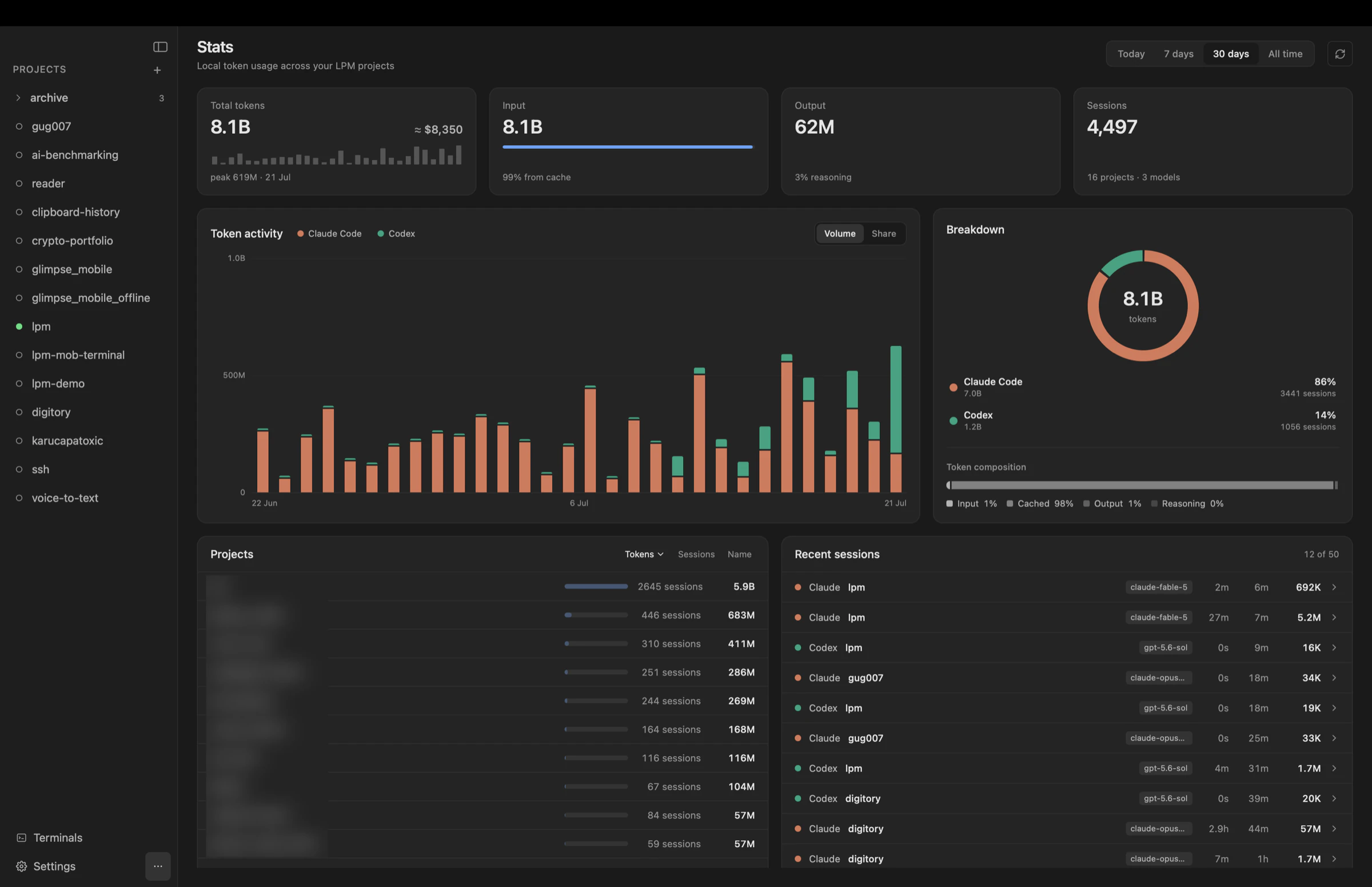
The total matters. The provider, project, model, cache share, and session behind it matter more.
Separate fresh input, cached input, output, and reasoning tokens. See the peak day and an approximate model-aware cost beside the total.
Read provider share at a glance, then switch the daily chart between token volume and percentage share to see how your workflow changes.
Rank projects by tokens or sessions and inspect recent runs with their provider, model, duration, recency, and token composition.
Start with the trend, then narrow the view until you know which project, provider, and model drove it.
Daily activity
Provider share
Token composition
Check whether context is being reused efficiently and how much of the result comes from output or reasoning tokens.
Projects & sessions
Open recent sessions to see provider, model, duration, recency, and the token mix behind each run.
Your existing local agent histories already contain the usage metadata. lpm turns it into a useful project view.
Use Claude Code or Codex as usual. lpm matches each local session to the configured project root where it ran.
lpm finds token and model metadata in the agents’ local session histories and groups it without adding prompts or responses to the dashboard.
Switch from today to all time, compare providers, sort projects, and inspect recent sessions whenever you need context.
The stats view is built from usage metadata in local Claude Code and Codex session histories. It gives you the operational picture without turning your work into another cloud analytics feed.
What the dashboard counts, where the data comes from, and what stays private.
Visually customize Claude Code and Codex statuslines with presets, live preview, colors, meters, and automatic local saving.
Run AI coding agents in parallel while every service, terminal, and project stays in view.
Pin work and personal Claude accounts to separate projects and run them side by side.
Give Claude Code and Codex tools to start services, read logs, and work across parallel copies.
Inspect every file an agent changed in a native diff view before you commit.
Download lpm for macOS, run Claude Code and Codex in your configured projects, and turn local usage metadata into answers you can act on.